

If you’ve started earning with Quibity, as an affiliate or content creator, you already know that you can receive your payments through the Lumanu platform by signing up via the link sent to you, which you can also find in the “Affiliation” section of your personal dashboard.
Don’t worry, Lumanu is 100% free and does not involve any cost for receiving our payments.
Now let’s take a look at how to use the platform correctly.
Why should I use Lumanu?
Lumanu is a creator-focused platform designed to make payments simple and hassle-free for you and Quibity.
Think of it as your go-to tool for seamless and fast payouts, so you can focus on creating content instead of dealing with admin.
Account setup
How do i set up a Lumanu account?
Setting up your Lumanu account is quick and easy.
Just sign up using the same email address you used to collaborate with Quibity. Make sure to complete all required fields and enter your tax information correctly to avoid delays.
Lumanu will send you reminders until your setup is complete.
Can I connect PayPal?
To receive your payments, you can connect a bank account, debit card, or PayPal account and set it as your withdrawal destination. This way, you can choose the method you prefer to get paid in a simple and direct way.
Can I connect multiple email addresses?
For security reasons Lumanu accounts are linked to a single email.
However you can still receive payments sent to different email by adding them as “Account aliases”:
- Log in to your Lumanu account
- Go to Settings / Account Details
- In “Account aliases” click “ADD” to insert the additional email
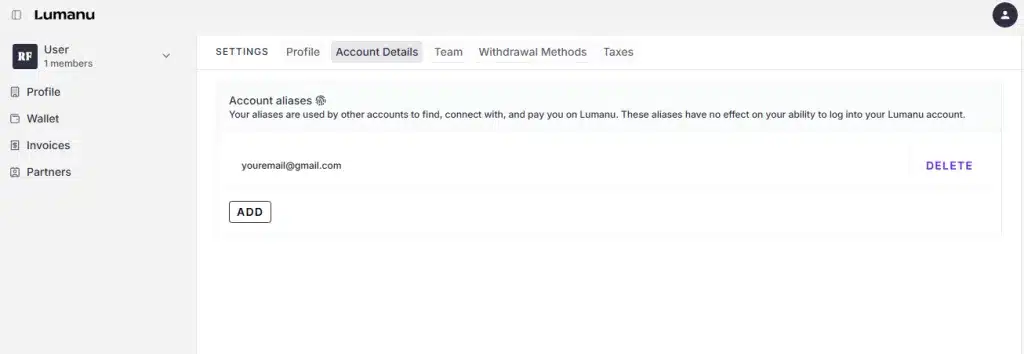
Done! Payments sent to any of these emails will go to your account.
I can’t associate my phone number with my Lumanu account
If your country is not currently supported on Lumanu, contact their support team to explore available options based on your situation.
Tax form
Do I need to fill out the tax form?
Yes! Filling the tax form is required by law and ensures your payments are processed without delays.
Once completed, you won’t have to worry about issues in future payment cycles.
Need help? Contact [email protected]
How do I fill out the tax form?
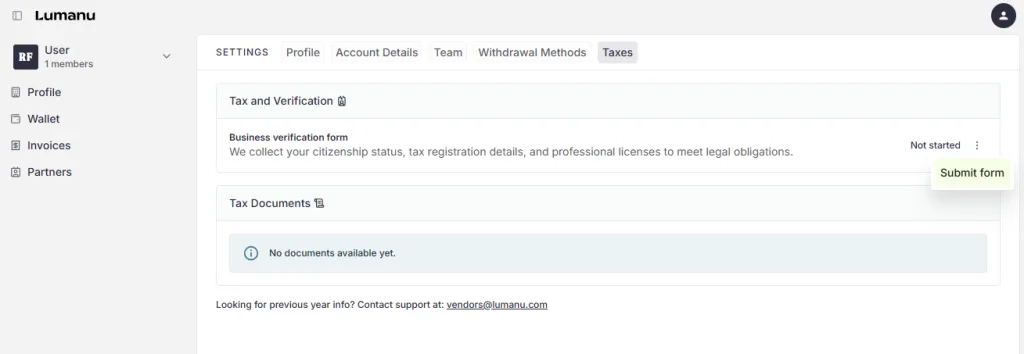
Go to “Settings” and click on the “Taxes” tab.
Click on the 3 dots to show the “Submit form” option and start the Business Verification.
Depending on your country of residence or where your business is registered, you will need to complete different fields.
If your information is correct, verification is usually instant.
If manual review is needed, it may take 24 to 72 hours.
Payments
How do I get paid?
Here’s how it works:
- Once your account is ready, Quibity will add you as a partner in Lumanu
- You’ll receive an email when your payout is approved and ready
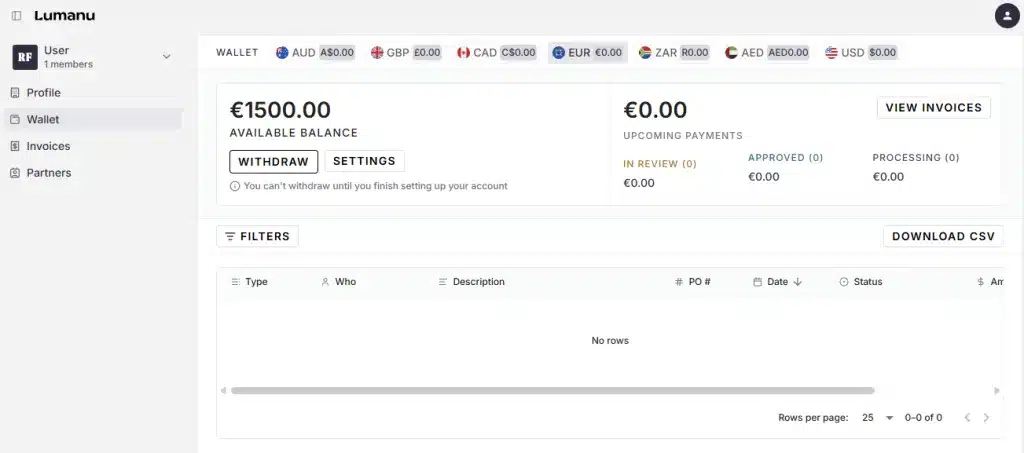
- Be sure to click on the button “WITHDRAW” to get your money
- The payment will then be transferred to the withdrawal method chosen
In which currencies can I be paid?
Although Lumanu uses USD as the default currency, you can withdraw funds in EUR, GBP, and other currencies. You can see them all in the “Wallet” section.
How long does it take to get paid?
The process includes three steps:
- Quibity sends the payment to Lumanu (typically within 4–6 weeks)
- Lumanu processes and transfers the funds to your account
- Once the funds are ready, you can withdraw them
Are there fees for international payments?
Lumanu does not charge any fees on your payments, but the method you choose to receive them, such as PayPal, may apply its own fees. These fees are completely independent of Lumanu or Quibity and are not included in the payment you will receive.
Billing
The creator issues the invoice in the traditional way, but addressed to Lumanu. Depending on their tax regime and tax residency, the creator will issue the invoice according to the instructions provided by their accountant.
There is no need to upload the invoice issued to Lumanu to the platform.
If you have any questions or need support, feel free to reach out. We’re here to help!